
You upload a CAD file, expect an instant price, and the quote comes back either surprisingly high or suspiciously low. Most of the time, the issue is not your geometry. It is the file type, the way it was exported, or the assumptions the quoting engine has to make from incomplete information. If you want an instant quote that stays stable through DFM review and into production, STL and STEP are not interchangeable.
This guide breaks down how STL and STEP behave inside automated quoting, when each format is the right choice, and what details actually move the needle on cost, lead time, and manufacturability.
What “stl step instant quote” really means in practice
An instant quote is only as good as the data it can reliably extract. Quoting software typically derives three things immediately: part envelope and orientation constraints, volume and surface area (for material and time estimation), and geometric risk factors (thin walls, small holes, unsupported features, tight internal radii).
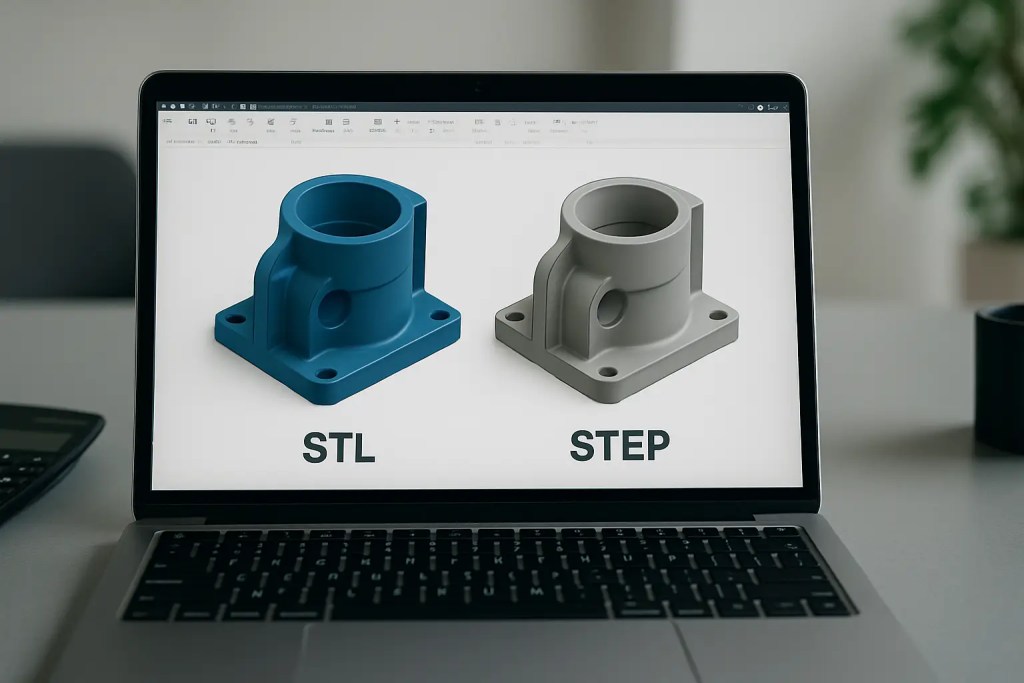
STL and STEP feed those calculations very differently. An STL is a triangle mesh – a faceted approximation of surfaces. A STEP file is a B-rep solid model with analytic surfaces and exact edges. When you request a stl step instant quote, you are really asking the system to price a part based on either an approximation (STL) or a precise solid definition (STEP), then map that to a specific manufacturing process.
That mapping matters because “instant” does not mean “final.” A stable quote is one where the automated estimate aligns closely with what an engineer will confirm in DFM and what the machine will actually build.
STL vs STEP: what the quoting engine can and can’t “see”
STL: fast for additive, but accuracy depends on tessellation
An STL contains triangles, not dimensions or design intent. If your tessellation is coarse, cylinders become polygons, fillets become segmented edges, and small features can disappear. A quoting engine reading STL can still compute volume and bounding box accurately enough for many polymer additive parts, but it has limited confidence in feature-level checks.
This shows up in two ways. First, thin-wall detection can be noisy because wall thickness is inferred from mesh proximity. Second, hole diameters and sharp edges may be misread, which can lead to incorrect assumptions about minimum feature sizes and post-processing effort.
STL is often acceptable for processes like SLS and HP Multi Jet Fusion where the workflow is already mesh-based, and where a small amount of faceting does not change functional performance. But the export settings matter. A “lightweight” STL that looks fine on screen can materially change volume, surface area, and the number of risky micro-features the software flags.
STEP: best for cross-process quoting and tighter engineering control
A STEP file preserves exact geometry and is the most portable way to communicate a solid model across additive, CNC machining, sheet metal, and tooling workflows. For instant quoting, STEP enables more reliable feature recognition – true cylinders, true planar faces, and explicit edges.
That gives the quoting system better inputs for manufacturability checks and downstream operations. Even if you ultimately 3D print a part, STEP helps when tolerances are tight, when mating interfaces matter, or when the part may later transition from prototype to CNC machining or injection molding.
If you are using instant quoting as a decision tool – not just a price request – STEP is usually the format that reduces quote volatility.
When to upload STL vs STEP for an instant quote
If the goal is a quote that is both fast and “production-realistic,” your choice depends on the process and what you are optimizing.
For polymer additive prototypes where you primarily care about turnaround and basic fit, an STL with appropriate resolution is typically fine. The mesh is what most additive toolchains will slice anyway. However, if your part includes precision bores, press fits, sealing surfaces, or gasket grooves, STEP is safer because it preserves exact diameters and faces that the DFM checks can evaluate.
For CNC machining quotes, STEP is the default. Machining cost is heavily driven by accessible faces, true radii, and feature geometry that is difficult to interpret from a mesh. While some shops accept STL for rough machining estimates, it increases the probability of a quote revision once the model is reinterpreted.
For hybrid builds – print plus machining, print plus inserts, or print plus post-processing that depends on datums – STEP reduces ambiguity. For metal additive (SLM) where support strategy and critical surfaces matter, STEP also helps because it supports better identification of functional faces and toleranced regions.
Why instant quotes change after review (and how to prevent it)
Engineers dislike quote churn because it breaks planning and procurement. Quote changes typically come from one of three gaps: geometry interpretation, process assumptions, or finishing assumptions.
Geometry interpretation issues are most common with low-resolution STL files. A hole that should be 6.00 mm might be represented as a slightly non-circular polygon. The system might infer it as undersized, flag it as a minimum-feature risk, or assume drilling/reaming is required.
Process assumptions are the next driver. Instant quoting typically asks you to choose a technology (SLS, MJF, SLA, FDM, SLM, CNC, etc.) and material. If the uploaded geometry violates process constraints – like unsupported thin features for FDM, or large flat surfaces prone to warp – the “instant” number may be optimistic until the DFM review recommends an alternate orientation, added supports, or a different process.
Finishing assumptions are the quiet cost multiplier. Surface smoothing, bead blasting, dyeing, anodizing, passivation, heat treat, and machining-critical features can shift both cost and lead time. A quote that prices only “as-built” parts will change when you specify cosmetic or functional finish requirements.
The prevention strategy is simple: send the geometry in a format that preserves intent (usually STEP), export it cleanly, and state finishing and tolerance expectations up front.
Export settings that make or break an STL-based instant quote
If you choose STL, treat export resolution as a controlled variable, not a convenience toggle. Overly coarse meshes under-report surface area and can erase small features. Overly dense meshes can inflate file size, slow upload, and occasionally create non-manifold artifacts that confuse automatic checks.
Aim for a mesh that represents curves smoothly at the scale that matters. If you have a 2 mm fillet that affects stress concentration or ergonomics, the tessellation must capture it. If your smallest functional feature is a 0.8 mm wall, the mesh needs to represent that wall with enough fidelity that thickness analysis does not produce false negatives.
Also confirm the mesh is watertight (closed), with consistent normals. Non-manifold edges and self-intersections are a common reason instant quote engines flag a file for manual intervention.
STEP files: what to verify before you upload
A STEP file can still be “wrong” if the model is not a valid solid or if it contains tiny sliver faces from complex surface operations. Before upload, verify you are exporting solids, not just surfaces, and suppress construction geometry that can introduce unintended bodies.
If your model uses multiple bodies, decide whether you need a single combined part or separate parts. Instant quoting typically prices per part, and unintended multi-body STEP exports can either overcount parts or trigger review.
If you are quoting an assembly as a single printed unit, make sure there are no interferences that create trapped volumes or inaccessible powder escape paths (for powder-bed processes). The quoting engine may not fully interpret assembly intent unless it is explicitly combined.
Process and material selection: the quote is not only about geometry
Even with perfect files, quoting accuracy depends on selecting a process that matches the performance requirement. Polymer powder-bed processes like MJF and SLS tend to be strong for functional prototypes and end-use polymer parts in materials such as PA12 and PA11. SLA tends to win on fine detail and smooth surfaces but can be more brittle depending on resin. FDM can be cost-effective and fast for large simple parts, but anisotropy and support scarring can affect function and finish.
For metal additive, alloys like AlSi10Mg and SS316L open up lightweighting and corrosion resistance options, but support removal, heat treatment, and surface finishing can become major cost drivers. If your end requirement is a tight tolerance on a bore or a flatness requirement on a sealing face, you should expect either machining allowances or secondary operations – and your instant quote should reflect that.
This is where a single workflow that covers additive, CNC, and post-processing reduces risk. If the quote engine can price secondary steps in the same transaction, you get fewer surprises later.
What to include with your upload to keep the quote stable
If you want the instant number to match the final, provide the constraints that affect manufacturing decisions. Call out critical-to-function dimensions, acceptable cosmetic variation, and whether parts are prototypes or short-run production. If a surface is a datum for assembly, say so. If you need threads, specify whether you expect printed threads, heat-set inserts, or tapped holes post-print.
If you are ordering multiples, specify whether you need all parts from one build lot for consistency. For regulated or quality-sensitive programs, ask about traceability and inspection options early so they can be scoped correctly.
If you need an ISO-aligned workflow and predictable execution from upload through shipping, Additive3D Asia runs an ISO 9001:2015-certified process with instant quoting across polymer, metal, and complementary production services – useful when you are moving from iteration to repeatable builds.
The practical takeaway: choose the format that matches the risk
If you care most about speed for an early prototype and the geometry is forgiving, STL can be the fastest path to a usable instant quote – as long as you export with sane resolution and a clean mesh. If you care about a quote that survives DFM review with minimal churn, STEP usually carries more engineering truth and supports tighter feature checks across additive and conventional processes.
The most reliable workflow is the one where the file you upload communicates exactly what you intend to build, and where you state the few requirements that drive real cost: tolerances, finishes, and functional surfaces. When those are clear, “instant” stops being a rough estimate and starts being a decision-ready number you can schedule against.